A stationery set from one brand concept: letterhead, envelope and business card
Three matching pieces from one concept: fix the mark, palette and type once, lay out each piece on its own, then check the set side by side before printing.
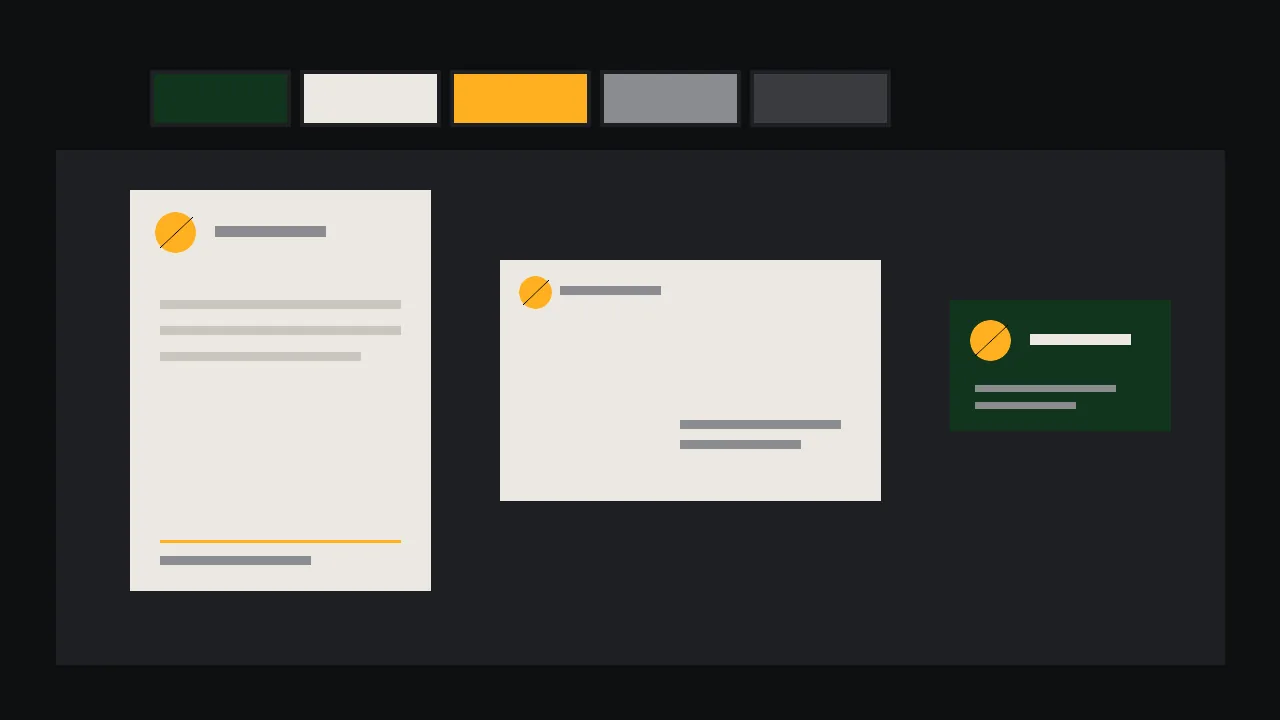
A letterhead, an envelope and a business card are three different shapes, and the person who receives them sees all three within a minute. If they look like cousins, the studio looks real. If each one wears a slightly different amber, a different corner for the mark and a different idea of what a heading is, it looks like three jobs from three weeks. The fix is not three clever prompts. It is one short sheet of decisions, made first, and a habit of checking the set together before anything is printed.
Our invented client is Tern Row, a two-person bookbinding studio. We will build their set in the order that saves the most rework.
Write the sheet before you open the studio
Open a plain note and fill in five lines. This is the whole brand concept, and every piece will borrow from it:
- The mark. One simple shape, described in words: a small circle with a diagonal cut through it, like a page being turned.
- The palette. Four colours and the paper: deep green, warm cream, one amber, a soft grey, on uncoated cream stock. Write what each one is for, such as amber only for the mark and one rule.
- The type voice. Two families at most: a sturdy serif for names, a plain sans for details. Use the words from our type vocabulary for AI posters to name the weight and width.
- The margin and the rule. One margin size and one thin line style that every piece repeats.
- The mood sentence. Quiet, handmade, exact. If a draft does not fit that sentence, it is wrong, however pretty it is.
If you already have a board with these answers, start from it. The brand identity board for a fictional roastery shows how to get one on a single page.
Make the mark once, then freeze it
The mark is the one element that must be identical on all three pieces, so do not regenerate it per piece. Make it in the studio on its own: a flat shape, one colour, plenty of empty space around it, no text. Ideogram V4.5 is a sensible place to start for flat, graphic compositions. Run many variations, pick one, and save that file as the master.
A simple flat logo mark: a solid amber circle with one diagonal cut through it like a turning page, centred on a plain cream background with a wide empty margin, one colour only, no text, no letters, no shadow, no texture, no mock-upNext, remove the background so the mark can sit on any piece. Ideogram V3 Generate Transparent and Ideogram Remove Background both exist for this. One honest limit: what you get is a raster image, a grid of pixels. A mark that will be printed small and large wants a clean vector redraw, which our guide from AI logo concepts to vector walks through. Do that once, now, and every piece inherits it.
Lay out each piece for its own shape
Same ingredients, different arrangement. That is what makes a set rather than a copy. Think of the mark as an anchor that moves around while the margin, the rule and the colours stay put.
Letterhead
A tall sheet that will mostly be covered by a letter. Keep the mark small in the top left, the name and address in a single quiet line in the footer, and a wide, empty body. Leave the writing area clear on purpose: a letterhead that looks finished before anyone writes on it is hard to use.
Envelope
A wide, folded object with a flap, and a postal service that cares where things go. Put the mark and the return address on the back or the top left, and leave the address window or the address area untouched. Check the rules of your post office for the zones it needs clear.
Business card
The smallest piece and the only one that gets a full colour block. Flip the roles: the mark can go large on a green back, and the front keeps only a name, one line of role and two ways to reach you. Small type on a card goes wrong first, so set the contact lines no smaller than your printer allows and check them on a real proof.
Backgrounds and any decorative band can be asked for separately, as flat art with no text and a named empty area, the way the label art is made in our jar label concept guide. A pattern for the inside of the envelope can come from the seamless pattern guide. Everything with words on it, you set yourself in a layout program, in the two families from your sheet.
Check that the set really matches
This is the step nearly everyone skips, and it takes ten minutes. Put the three pieces in one frame, at the same relative scale, on a neutral ground, and go through a short list.
- The squint test. Blur your eyes. Do the three read as one family by colour and weight alone?
- The colour count. Use an eyedropper on each file. The same four values should appear, and nothing new. A drift from amber to orange usually comes from a regenerated background.
- The mark. Same shape, same proportions, same colour, never stretched. If you placed the frozen master, this is automatic.
- The type. Count the families and weights. More than your sheet allows means one piece wandered.
- The edges. Margin and rule feel the same distance from each edge, adjusted for the size of the piece.
- The hierarchy. On each piece the name comes first, the detail second. If the card shouts the address, reorder it.
If one background is off while the rest is right, do not regenerate the whole thing. Ideogram V4.5 Edit takes a mask, so you can change only the part that drifted. Compare the new file against the others and run the checks again.
What you have, and what you still need
What comes out of the studio is raster images: a mark, backgrounds and bands, plus a concept you have checked as a set. It is not a print-ready file and it is not a vector. Before printing, redraw the mark as a vector, set the text yourself as live type, build each piece at its real size with bleed and a safe margin, convert to the printer's colour profile and order a printed proof on the real paper. If the art goes up in size, an upscale such as Crystal Upscaler can help, but an upscaler cannot turn a raster into a clean vector. Paper weight, the finish and whether the envelope is bought blank or made to order are conversations with your printer. Browse what is available on /models and try the mark in the studio.
Questions
Can I generate a whole stationery set in one go?
You can generate art for it, but the set holds together because of decisions you make first: one mark, one palette, two type families. Make the mark once, reuse that file and lay out each piece yourself.
Are the files ready to send to a printer?
No. The studio gives raster images. You still redraw the mark as a vector, set the text as live type, add bleed at real size, convert the colours and approve a printed proof.
How do I stop the colours drifting between pieces?
Write the colours down once, ask for flat art with those colours only, and compare the three files with an eyedropper. Fix one drifting piece with a mask edit instead of regenerating everything.