A seamless repeat pattern from an AI picture, for wrapping paper and fabric
Turn a generated motif into a tile that repeats without a visible seam: prompt flat all-over art, check the offset, fix the seam, set the scale, test print.
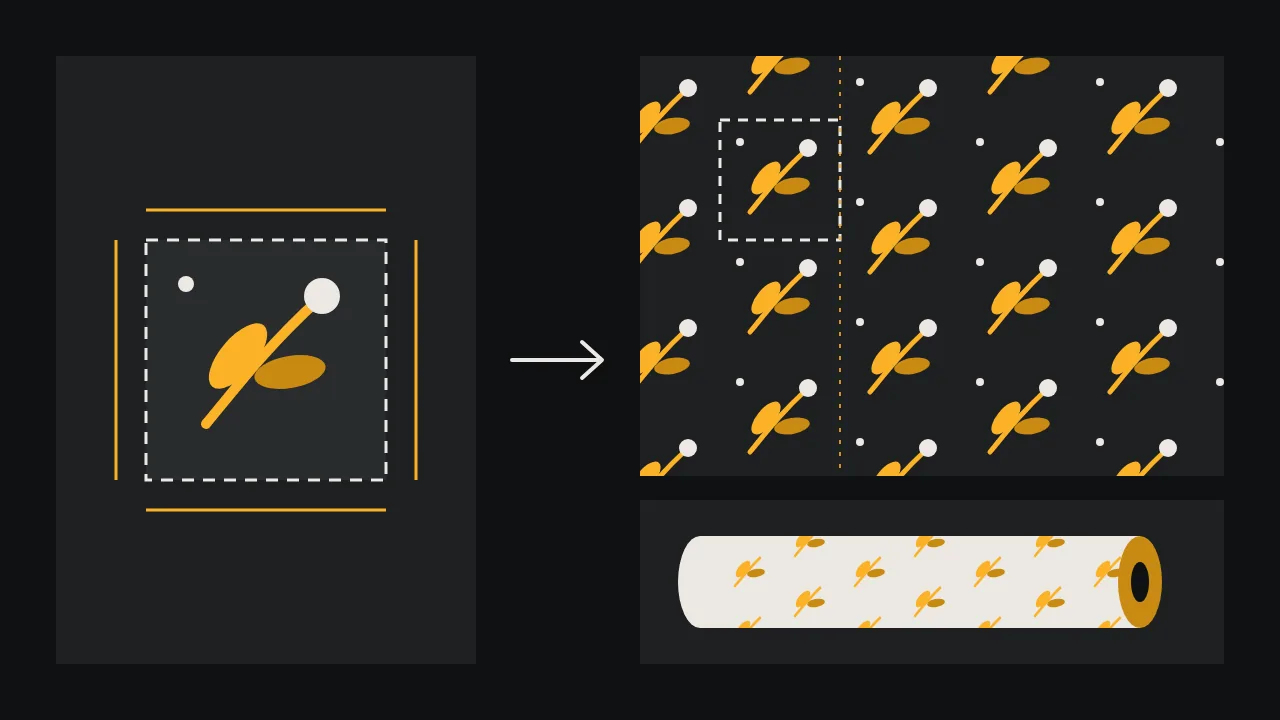
A pattern for wrapping paper or fabric is judged at the seams. Nobody looks at one tile; they look at a whole roll, and the eye finds the one straight line where the right edge of the tile meets the left edge of the next copy. An image model will happily paint you a lovely square of leaves and berries. Whether that square becomes a repeat is a separate job, and most of it happens after generation. This guide walks through it in the order that wastes the least work.
Ask for a flat, all-over motif
Models default to pictures: a subject in the middle, a background that fades towards the edges, light coming from one side. All three break a repeat. A centred subject makes a grid of polka dots, a vignette turns into dark stripes, and a light direction becomes a visible wave across the roll. So the prompt has to describe a surface, not a scene.
- Say all-over and edge to edge. Ask for motifs spread evenly across the whole square, including ones cut off by every edge. A pattern with empty edges looks like a sticker sheet once it repeats.
- Say flat. Flat colour, no shadows, no gradient, no texture of paper or cloth. Texture is added in print by the material itself.
- Name the colours and how many. Three or four named colours plus the ground, so you can count them later.
- Ask for a square. A 1:1 ratio is the easiest tile to offset and to scale.
Flat all-over surface pattern, small sprigs of olive leaves and round berries tossed at random angles, evenly spaced across the whole square and running off every edge, three colours only: ochre, sage green and cream on a deep charcoal ground, flat colour, no shadows, no gradient, no vignette, no paper texture, no border, no text, squareIdeogram V4.5 takes a prompt like this well and offers 1:1 among its ratios. Generate a dozen at low quality and keep the ones where the motifs are evenly spread; a square with a dense clump in one corner will show that clump as a rhythm across the roll.
Is there a tileable switch?
We checked the settings of the image models on /models. No model has a setting that promises a tile whose edges join exactly. Two come close: Recraft 20B lists a style called seamless under digital illustration, and Recraft 20B SVG lists a seamless vector illustration style. They are worth a round, because they are built to produce pattern-like art. Treat what they return the same way as any other square, though: run the check below before you believe it.
The offset check
This is the one test every pattern designer runs. In any image editor, shift the tile by exactly half its width and half its height, with the pixels that fall off one side wrapping around to the other. Most editors call this filter Offset. What used to be the outer edges now meets in a cross through the middle of the image, so any seam is right in front of you: a hard vertical line, a horizontal one, leaves cut in half that do not continue.
Then run the second check, for the way the tile will actually be printed. A plain block repeat puts copies side by side in a grid. A half-drop shifts every second column down by half a tile, which breaks the grid up and is common on wrapping paper and fabric. Paste nine copies in the arrangement you plan to use and look at it from across the room. You are looking for tracking: diagonal lines, stripes or holes that only appear when the tile repeats.
Fixing the seam
Fix the seam on the offset version, where it sits in the middle. Whatever you repaint there stays inside the tile, and the outer edges are still the original pixels that already join. When you are done, offset back or simply keep the shifted tile: both repeat the same way.
With an edit model
Paint a mask over the cross, a band a little wider than the seam, and give the model the offset tile. Ideogram V4.5 Edit takes a mask where black marks the area to change and white keeps the rest, so the edges that already join are left alone; set edit precision to high, which restores the unchanged pixels, and leave the size empty as that setting asks. Bria GenFill also fills a masked region from a prompt. Describe the pattern, not the fix:
Continue the same flat pattern of olive sprigs and round berries across this area, same three colours on the charcoal ground, same size and spacing as the rest of the image, flat colour, no shadowsBy hand
For a few motifs on a plain ground, hand work is often faster. Clone or move whole motifs across the cross so no leaf is cut by it, and fill the ground with the exact ground colour. If your pattern is flat enough, a vector route is cleaner still: trace the motifs, as in our logo concept to vector guide, and rebuild the tile in a vector editor, where a motif crossing an edge can be copied to the opposite edge at exactly one tile width.
Scale on the roll
Decide how big one repeat should be on the finished paper or cloth before you prepare the file, because the same tile reads very differently at different sizes. Small sprigs at the size of a thumbnail feel like a classic gift wrap; the same tile at the width of a hand reads as a bold print for a cushion. Hold a ruler against a gift box or a piece of fabric you like and measure its repeat.
Then work out the pixels: repeat size times the resolution your printer asks for. If the tile is too small, upscale it with a faithful setting; Crystal Upscaler has a creativity slider where 0 adds no invented detail. Upscale before you check the seam for the last time, because an upscaler sees the edges as edges and can treat them differently from the middle.
Count the colours
Digital printing on paper or fabric prints any number of colours, but screen printing and some wrapping paper runs print one screen or one plate per colour, so the count is the price. Reduce the art to the colours you named in the prompt: an image model adds dozens of near-identical shades along every edge. The separation work is the same as for any limited-ink job, and our rules for one-ink printing cover it. If the pattern belongs to a brand, take the colours from its board, as in the brand identity board for a fictional roastery, rather than from whatever the model chose.
A test print before the run
A seam that is invisible on screen can show on paper, and colours on fabric always shift. Before ordering a roll or a bolt, print the repeat at its real size on an office printer, tile four sheets edge to edge with tape, and look at it from a few steps away. Then order the smallest sample your printer or fabric service offers, on the material you will actually use. Wash the fabric sample once if the finished piece will be washed. Only then order the run.
What the studio gives you is the motif and the tools to repair it. The repeat itself, the scale, the colour count and the proof are yours to decide. Browse the image and edit models on /models and start a pattern in the studio.
Questions
Can an AI image model make a seamless pattern directly?
It can make a flat all-over motif, and two models list a seamless style. None promises edges that join exactly, so run the offset check on every result and fix the seam if one shows.
What is the offset check?
Shift the tile by half its width and half its height with the edges wrapping around. The old edges meet in a cross in the middle, where any seam is easy to see and to repair.
Block repeat or half-drop?
A block repeat is a plain grid. A half-drop moves every second column down by half a tile, which hides the grid and suits tossed motifs. Check the tile in the arrangement you will print.
How many colours can the pattern have?
Digital printing takes any number. Screen printing and plate printing charge per colour, so reduce the art to a few flat colours and separate them before you send the file.