A consistent icon set with AI: one master icon, eleven siblings, one style
Twelve app icons that look like one family: write the rules, prompt a master icon, derive the siblings from it, test them small, then redraw the set as vectors.
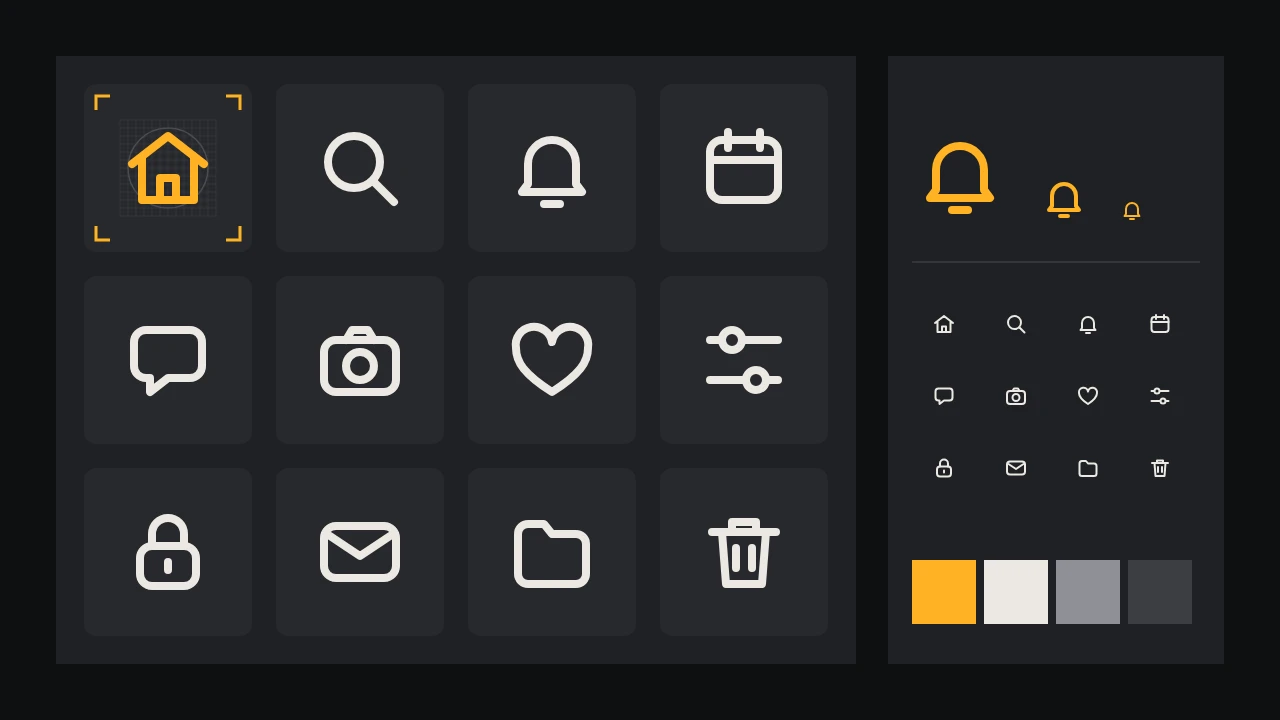
Ask an image model for a bell icon and you will get a nice bell. Ask again for a padlock and you will get a nice padlock, drawn by what looks like a different hand: thicker lines, sharper corners, a slight tilt, a touch of shading the bell never had. Put them side by side in a tab bar and the app looks assembled from three free packs. An icon set is judged as a set, and the reader notices the odd one out long before they notice a good one.
This guide builds twelve icons for an invented note-taking app called Quillbox: home, search, notifications, calendar, messages, camera, favourites, filters, lock, mail, folder and delete. The method is the same for any list. Decide the rules, make one master icon that obeys them, derive every other icon from that master, check them at the size people will really see, and finish by redrawing in vector.
Write the rules before the first prompt
Consistency is a handful of numbers that every icon shares. Write them on one card and keep it open the whole time:
- The grid. A square canvas, say 24 by 24 units, with a padding of 2 units that nothing crosses except on purpose. Every icon is designed on this grid and only scaled at the end.
- The stroke. One weight, for example 2 units, with round ends and round joins. Outline icons and filled icons do not mix in one set; pick one.
- The corner radius. One radius for every rectangle, such as 3 units on the outer corners. A calendar with soft corners next to a mail icon with sharp ones is the most common giveaway.
- The keyline shapes. A circle, a square and a wide rectangle that fill roughly the same area, so a round icon and a square icon look the same size to the eye.
- The palette. One line colour for the set, plus at most one accent for the active state. No gradients, no shadows, no second line colour for decoration.
- The perspective. Flat and straight on. No three-quarter views, no isometric tilt.
Prompt one master icon, and only one
Choose the master with care: a simple icon that uses most of the rules at once. A house works well, because it has a straight stroke, a corner, a join and a small inner shape. Write the card into the prompt in plain words and ask for a single icon on a plain background, nothing else.
A single flat line icon of a house, outline only, uniform medium stroke with rounded line ends and rounded corners, centred on a plain white square background with generous empty space around it, one colour only, dark charcoal lines, no fill, no shading, no gradient, no shadow, no text, no mock-upTwo kinds of model in the catalog suit this. Recraft 20B SVG is described as making SVG vector images for scalable graphics and icons, and Recraft V4.1 Text to Vector as making editable vector-style images from a prompt. If you would rather start from a raster drawing on a clean cut-out, Ideogram V3 Generate Transparent returns images with a transparent background. Run the prompt many times and judge the results against the card, not against taste. The master you keep is the one that obeys the rules best, even if another draft is prettier.
Derive the siblings from the master
Here is where most sets fall apart: eleven fresh prompts give eleven fresh interpretations. Instead, make the master the reference for everything that follows. The catalog has a direct route for this. Recraft V4 Create Style turns reference images into a reusable style ID, and Recraft V4 Style Text to Vector draws a vector graphic from a prompt plus that style ID or the reference images directly. Feed it your master, and once you have two or three good siblings, add them as references too, so the style is learned from a small family rather than a single drawing.
Keep each sibling prompt boring. Same sentence as the master, only the object changes: a bell, a magnifying glass, a padlock. Resist adjectives that pull the style away, such as cute, detailed or realistic. Describe the object by its simplest shapes: a padlock is a rounded rectangle under a half-circle loop, with a short line for the keyhole.
- Hard objects first. Camera, filters and calendar have the most parts and drift the most. If they hold, the rest will.
- Metaphors stay plain. Notifications is a bell, favourites is a heart, delete is a bin. A clever metaphor is a separate design decision, not a prompt experiment.
- One object per icon. A folder with a star on it is two icons. Add the badge later in vector, the same way for every icon that needs one.
- Small fixes, not new draws. If a good sibling has one wrong detail, such as a sharp corner on an otherwise right camera, Ideogram V4.5 Edit takes a mask, so you can change that part only.
Style locking narrows the variation; it does not remove it. Expect a few rounds before all twelve sit together, and expect to correct the rest by hand in the next steps.
Line them up and check them small
Put all twelve on one sheet in a 4 by 3 grid, on the same background, at the same size. Then shrink the sheet until each icon is about the size it will be in the app: 24 pixels for a toolbar, 16 for a menu or a dense list. Look at it on a real phone, not only on a large monitor. Go down the list:
- The squint test. Blur your eyes. All twelve should have the same grey weight. One that reads darker has a thicker stroke or too many lines.
- The size test. Round icons and square icons should look the same size. If the search icon looks smaller than the mail icon, push it out to the circle keyline.
- The detail test. At 16 pixels, any gap narrower than a stroke closes up. The keyhole in the lock and the lens ring of the camera are the usual victims; drop them or open them up.
- The guess test. Show the small sheet to someone who has not seen it and ask what each icon means. Anything they hesitate on needs a simpler shape or a label next to it in the app.
- The state test. Try each icon in the accent colour on the active tab. If a filled version is part of your system, it must be filled the same way for all twelve.
Clean up to vector
Even when a model returns an SVG, open it before you trust it. Generated paths are often lumpy: dozens of nodes where three would do, strokes stored as filled outlines of slightly different widths, corners that are almost but not quite the same radius. For a set, the cleanest route is to redraw each icon on your grid with real strokes, using the generated file only as a guide underneath. Our guide from AI logo concepts to vector covers tracing by hand and simplifying shapes, and the same habits apply here.
What is specific to icons is the shared construction. Set the stroke weight and corner radius once as a style in your editor and apply it to all twelve, so a later change to the stroke changes the whole set. Align points to the grid so lines land on whole pixels at the main size. Keep the master file with every icon on its own artboard, named by what it means, such as icon-search rather than magnifier, and export from there in the formats your developers ask for.
If the icons need to live alongside a wider identity, the palette and style ID can come from the same place as the rest of the brand, as in the brand identity board for a fictional roastery. The idea of freezing one master and building everything else around it is the same one that holds a stationery set together.
What stays your job
The model gives you drafts and a direction. The final set is the redraw: consistent strokes, a real grid, tested at real sizes. Check that no icon is a near copy of another company's well-known symbol, and follow the platform guidelines where a store or an operating system has its own rules for app icons. When the twelve hold, adding a thirteenth is easy: the card, the master and the style ID are already there. Browse the vector and design models on /models and start your master in the studio.
Questions
Can AI make a whole icon set in one go?
It can draw the icons, but the consistency comes from rules you set first and from deriving every icon from one master. Use a style built from that master, then redraw the set in vector so the strokes and corners really match.
Do the vector models give me finished SVG icons?
They give you a vector starting point. Open the file, check the paths and the stroke widths, and expect to redraw on your grid, because generated paths are rarely as clean or as uniform as a hand-built icon.
How small should I test my icons?
At the size people will see them, usually 24 pixels in a toolbar and 16 in a dense list, on a real screen. Repeat the test after the vector redraw, since that is the version users get.